FDIC-Insured - Backed by the full faith and credit of the U.S. Government


Deposit checks from your mobile device using the MyFarmers Mobile app. Mobile Deposit is available for eligible personal and business accounts. First-time users must request access, and all requests are subject to review and approval by Farmers Bank & Trust.
Important Information:
Before submitting a check through Mobile Deposit, sign the back of the check and add the required restrictive endorsement.
Example:
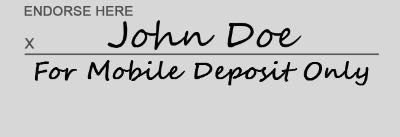
Your endorsement must be completed before you photograph and submit the check.
Some checks offer a space to check mark for mobile deposit. This does not meet Federal legal requirements for mobile deposit activities.


Directions:
- Download the MyFarmers Mobile app from the App Store or Google Play.
- Log in using your MyFarmers Online Banking username and password. If you do not have a MyFarmers Online Banking account, begin the enrollment process online or call us at 855-855-3268.
- Select Deposits from the app menu. First-time users will be prompted to request Mobile Deposit access and select the eligible accounts they would like to use.
- Farmers Bank & Trust will review your request. Mobile Deposit access may be approved or denied. Once approved, Mobile Deposit will become available for your approved accounts.
- To submit a deposit, select Deposit a Check and follow the instructions to photograph the front and back of the check.
- Review the deposit details carefully and submit the deposit. You will receive a confirmation when your deposit has been submitted. Submission does not mean that the deposit has been approved or that the funds are immediately available.
- Write the date of the deposit on the check and retain it in a secure location for at least one month before destroying it.
Eligibility, Limits and Funds Availability
- Deposit Limits: The normal deposit limit is 10 transactions totaling $10,000 per day or 50 transactions totaling $20,000 total for the week and month.
- Eligible Accounts: Mobile Deposit may be used with eligible personal and business checking and savings accounts. Consumers, small businesses and microbusinesses commonly use Mobile Deposit. Businesses with higher check volumes may benefit from Remote Deposit Capture. Contact Treasury Services to determine which deposit option best fits your business.
- Mobile Deposit access is subject to eligibility, review and approval. All submitted deposits are subject to verification and the Bank’s funds-availability policies. Funds may not be available for immediate withdrawal. Message and data rates may apply.